If you’ve read anything about the Model Context Protocol (MCP), chances are you’ve seen the “USB‑C for agents” analogy.
It’s catchy. It’s also where many teams accidentally go off the rails.
Because when MCP is misunderstood as “a new way to expose our API to ChatGPT”, the obvious implementation path is: take every endpoint, wrap it as a tool, ship an “MCP server”… and wait for the magic to happen.
Except the magic doesn’t happen. Instead, you get an assistant that behaves inconsistently, picks the wrong tools, invents parameters, and can’t be made reliably safe without reworking everything.
This post is a practical, product-minded guide to what MCP actually is, why teams misapply it, and how to design MCP integrations that lead to assistants you can control (instead of assistants that control you).
Why MCP exists: the M×N integration mess
LLMs got good enough to be useful, but usefulness doesn’t come from “smart answers”. It comes from connecting models to real systems:
- fetching the right data (invoices, tickets, customer records)
- taking actions (update a subscription, create a case, schedule a delivery)
- doing it safely and repeatably
The early problem: every model host and every system had its own tool interface.
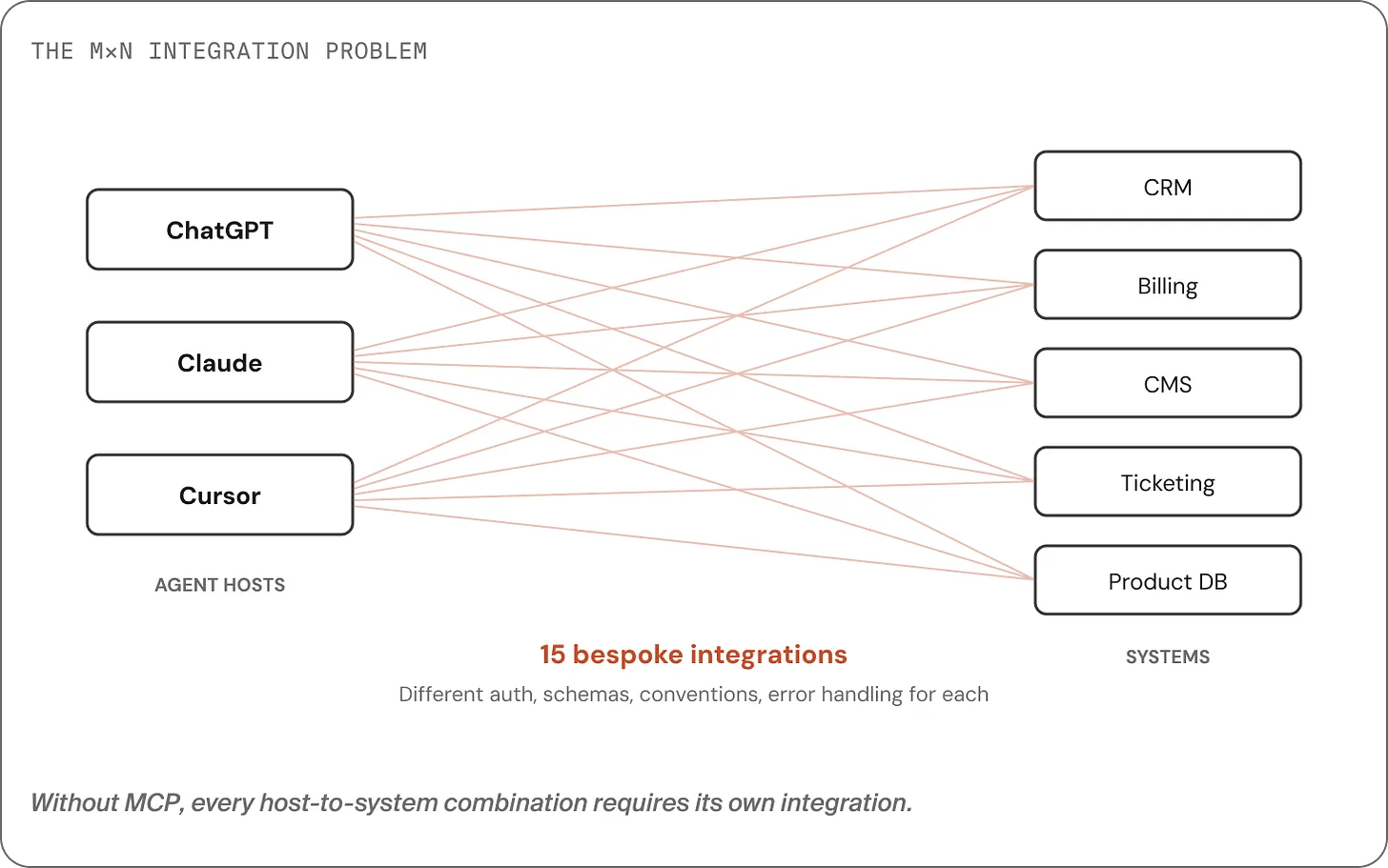
If you have M agent hosts (ChatGPT, Claude, Cursor, your own app) and N backend systems (CRM, billing, ERP, knowledge base…), you end up with M×N integrations to build and maintain.
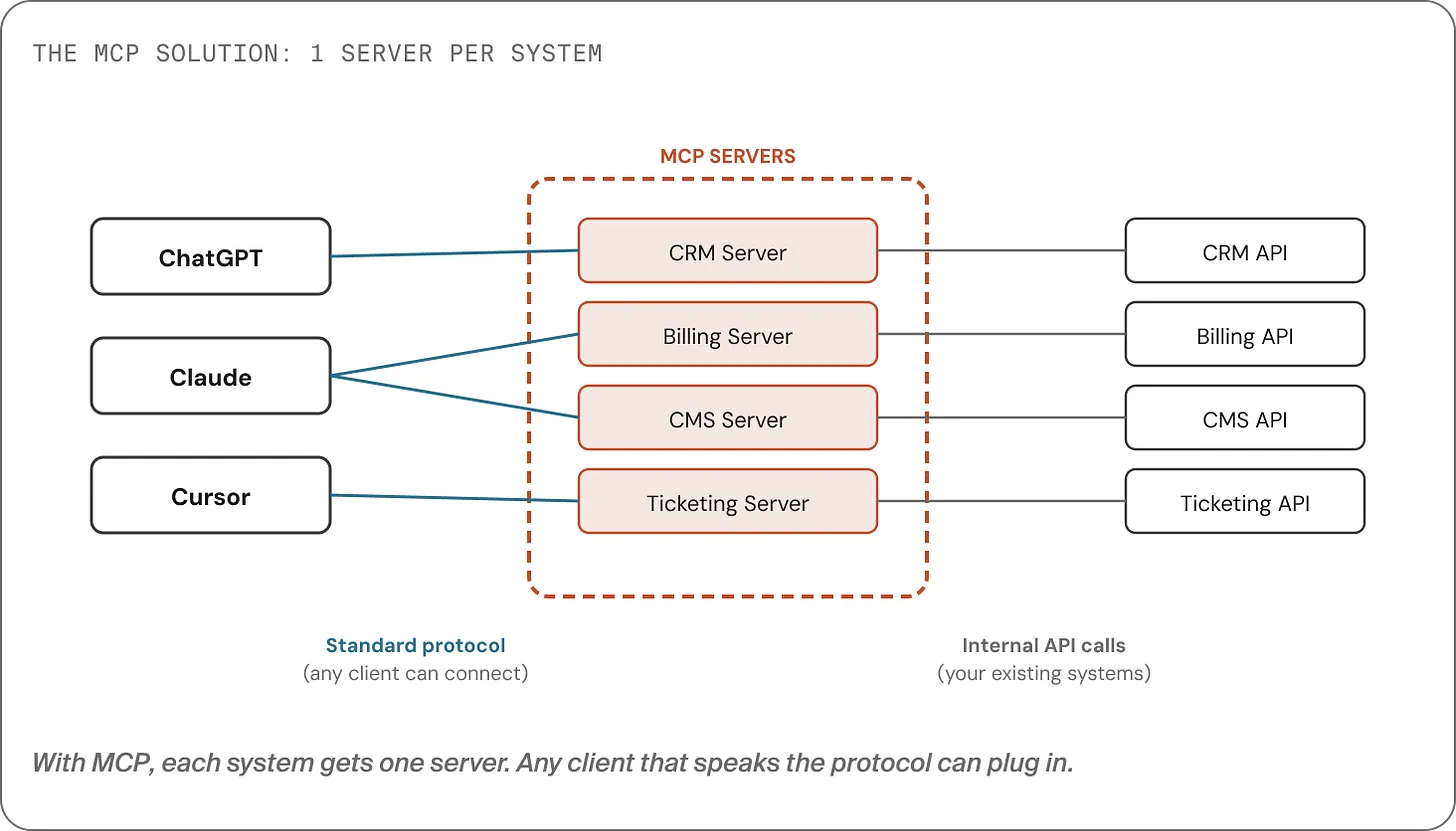
MCP flips that to M+N:
- build one MCP server per system
- any host that speaks MCP can plug in
That’s the elevator pitch. But it’s also where many explanations stop and where many teams accidentally build the wrong thing.
The big misconception: MCP is not “your API, but for agents”
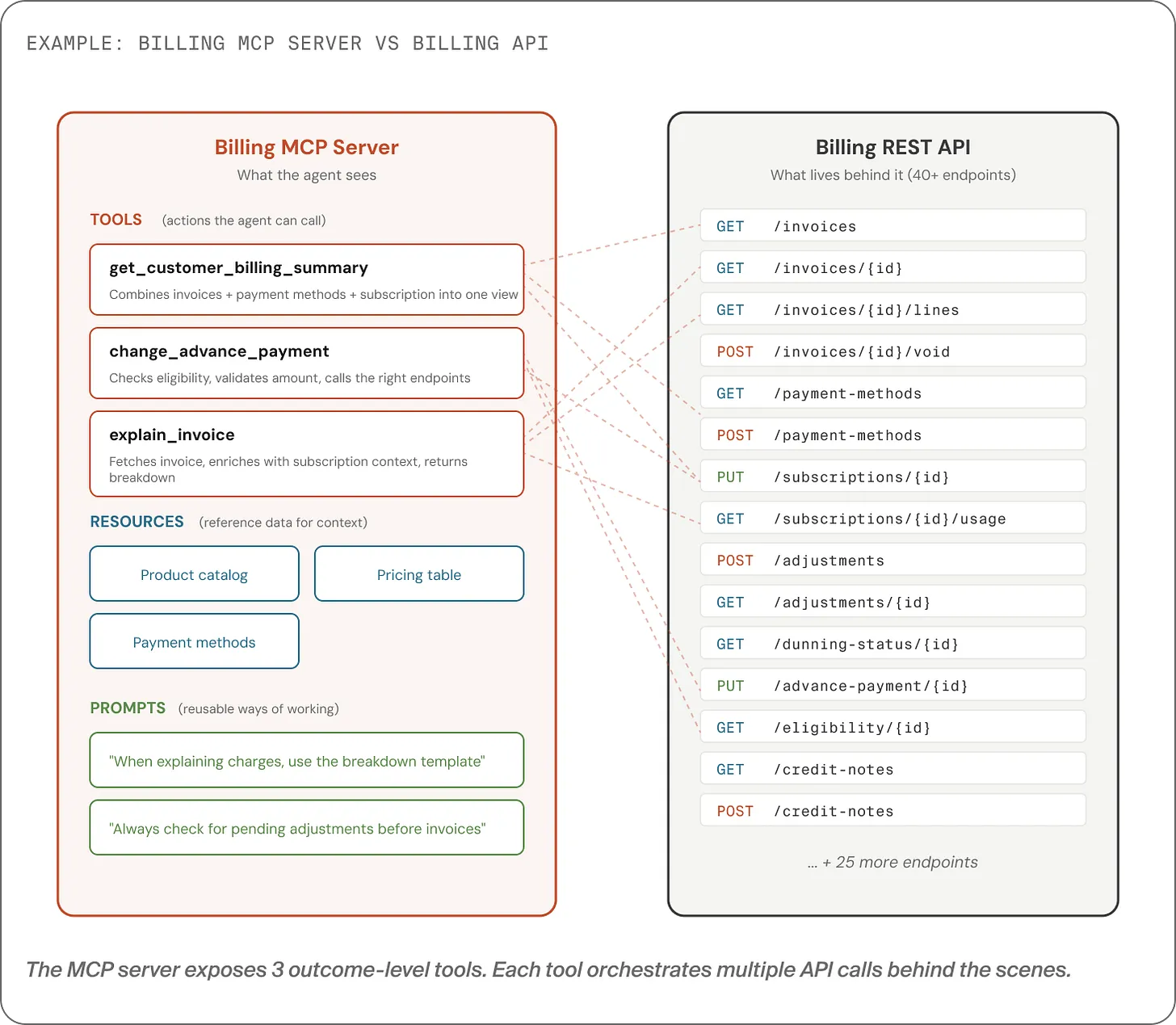
Most teams treat MCP as a transport problem: “We have 40 endpoints. We’ll turn them into 40 tools. Done.”
This is a natural engineering instinct and it’s usually the wrong one.
To understand why, you need the difference between an interface designed for developers and one designed for an agent.
APIs are designed for humans
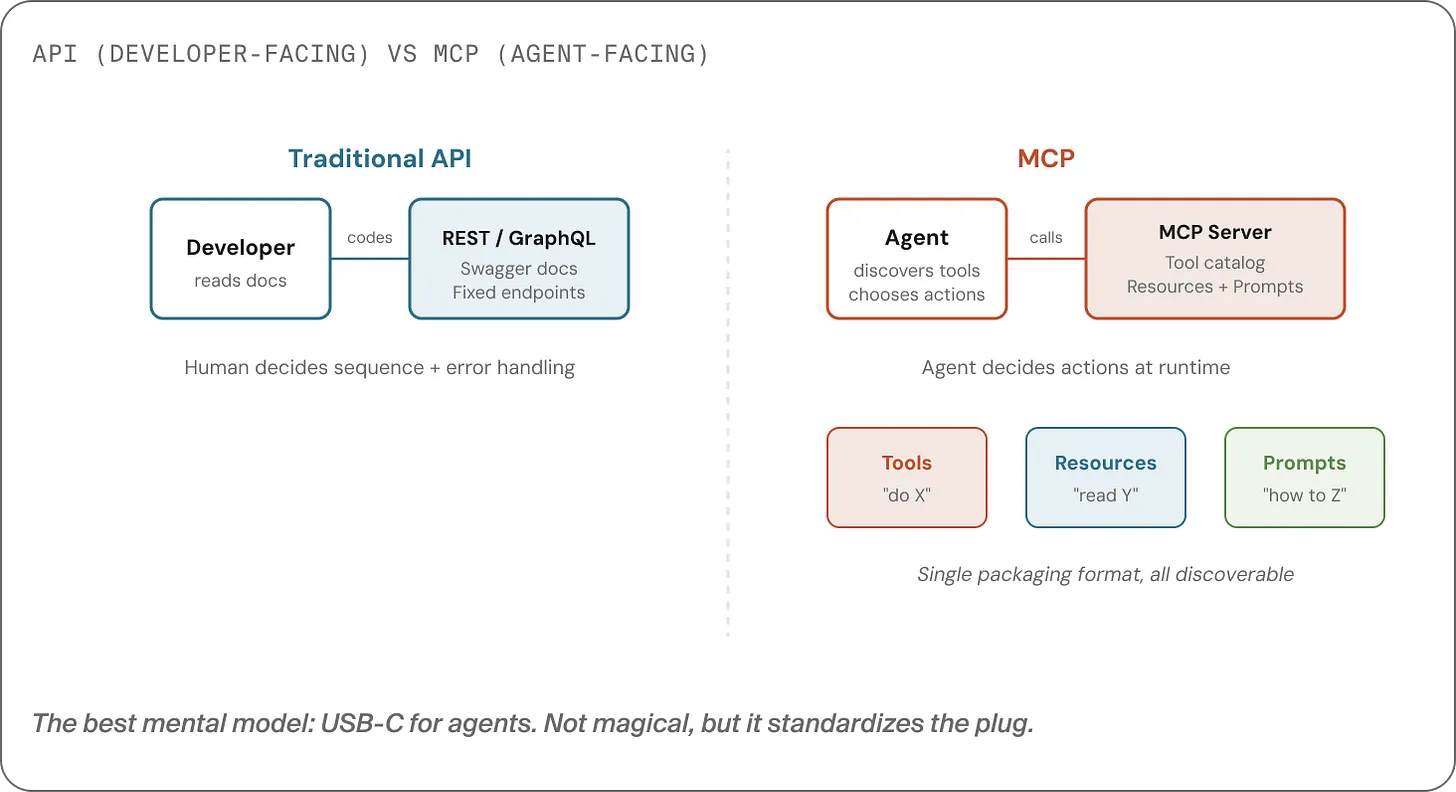
Humans can:
- read documentation
- choose endpoints and sequence them correctly
- validate inputs and handle edge cases
- write tests and make behavior deterministic
So APIs are typically granular, flexible, and comprehensive.
Agents are designed for real-time decision-making
Agents don’t read docs the way humans do. They:
- scan what’s available
- pick a tool based on names/descriptions
- call it with best-guess parameters
- interpret results and decide what to do next
That means an agent-friendly interface needs:
- Discoverability: “What can you do?” should return a structured catalogue.
- A small surface area: a handful of well-named verbs, not dozens of similar actions.
- Opinionated semantics: safe defaults, predictable behavior, informative errors.
MCP is a standard for packaging that kind of interface.
What MCP actually packages: tools, resources, prompts
MCP defines three primitives:
- Tools: actions the agent can take (verbs)
- Resources: reference material the agent can read (context)
- Prompts: reusable patterns/instructions for how to approach a task (playbooks)
Here’s the key line:
MCP is a packaging format for agent-friendly capabilities not a catalogue of your endpoints.
Your API is the raw material. Your MCP server should be the capability layer built on top.
“Host”, “client”, “server”: the vocabulary that clears up architecture
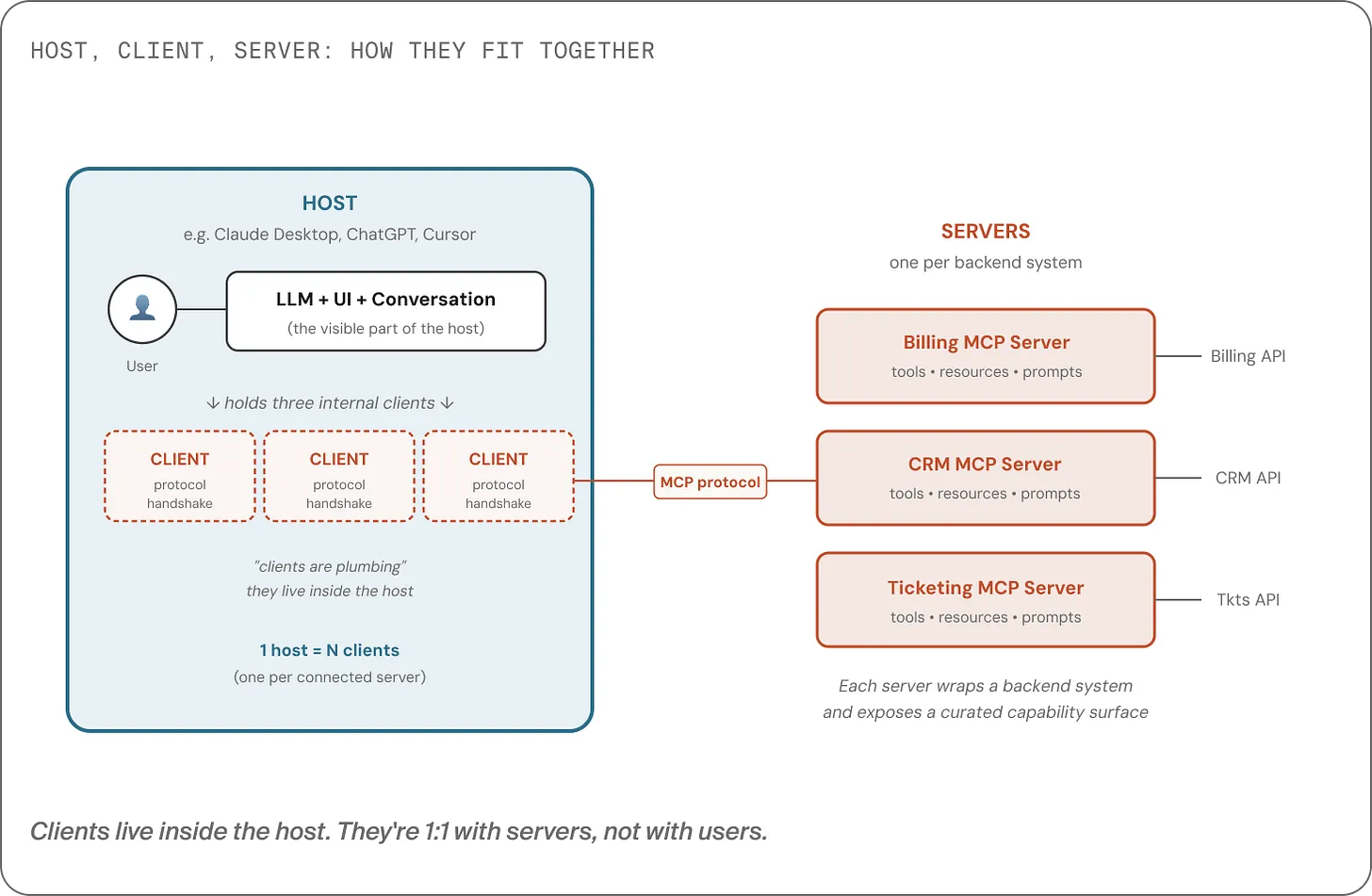
MCP discussions often blur three roles:
- Host: the app the user interacts with (ChatGPT, Claude Desktop, Cursor, your product)
- Server: exposes tools/resources/prompts for one system (billing, CRM, search…)
- Client: a small component inside the host that connects to one server
One host can talk to multiple servers and it does that by running multiple clients (one per server).
This matters because it nudges you toward the right design question:
“What capabilities should our system expose to agents?” (server design)
rather than “How do we expose all endpoints?” (endpoint translation)
The failure mode: tool zoos + missing orchestration
When you expose endpoint-level tools, you typically create two coupled problems:
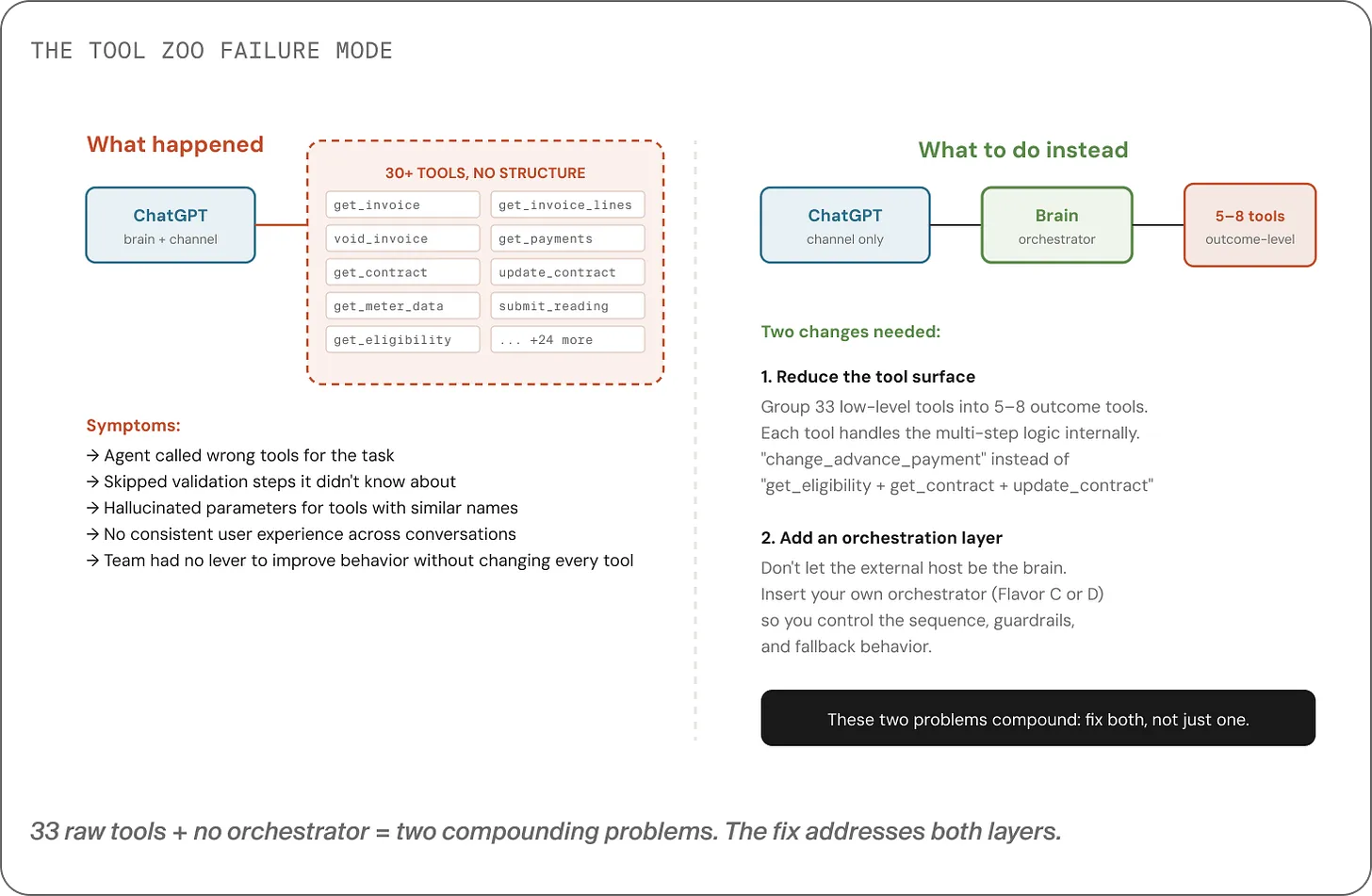
1) The tool zoo
With 30+ similarly-named tools, the model can’t reliably pick the right one.
It guesses. Sometimes it guesses right. Often it doesn’t.
2) Missing orchestration (where the “brain” lives)
If the host (e.g. ChatGPT) is making all decisions:
- it may skip validation steps
- it may apply business rules inconsistently
- you have limited ways to enforce “always do X before Y”
Yes, you can write better tool descriptions. That helps but descriptions are advisory. They aren’t enforcement.
For rules that must hold every time (financial checks, compliance, safety), “hoping the model follows the description” isn’t enough.
The fix: outcome-level tools + an orchestration layer you control
A solid MCP integration usually makes two independent moves:
1) Collapse endpoint-level tools into outcome-level tools
Instead of exposing 40 tools, expose ~5–6 tools that map to user outcomes.
Example for billing:
change_advance_payment(one tool)
Internally, that single tool might orchestrate multiple calls:
check contract type → validate eligibility → confirm legal minimums → check pending adjustments → update → create confirmation reference → notify.
The agent sees one verb. Your system owns the complexity.
2) Decide where the “brain” lives (and make it explicit)
This is the question most teams answer by accident.
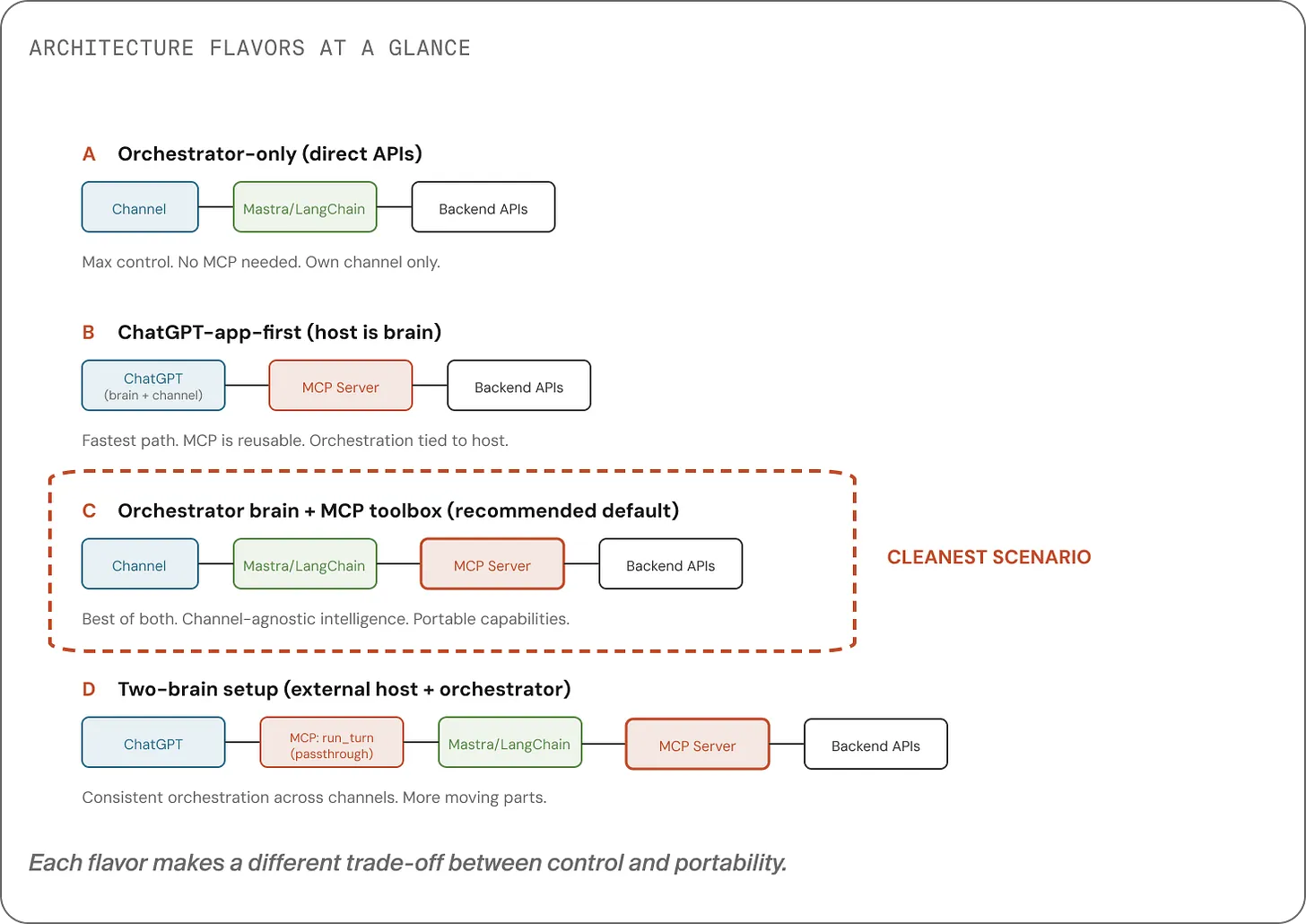
There are four common patterns:
- Own everything: your UI + your orchestrator + direct APIs (max control, less portable).
- Host is the brain: ChatGPT orchestrates and calls your MCP tools (fastest, least control).
- Your system is the brain: your orchestrator calls MCP tools (portable + consistent).
- Two-brain / passthrough: external host calls one MCP tool that forwards to your orchestrator (best consistency across external channels, more setup).
At Nimble, we generally recommend one brain that you control, and then multiple “doors” into it.
Owned channels can call your orchestrator directly. External hosts can be bridged via a single passthrough tool not because it’s elegant, but because it’s the most reliable option available today.
The takeaway
If MCP becomes your team’s default way to connect assistants to systems, remember this:
- MCP is not a new kind of API.
- It’s a capability contract for agents: small, discoverable, outcome-oriented tools.
- The hard part isn’t the protocol. The hard part is capability design.
- MCP doesn’t answer where decisions should live, you do. Put the brain where you can enforce rules.
When you design MCP servers as capability layers and pair them with an orchestration layer you own, you get assistants that are:
- safer
- more consistent
- easier to evolve
- portable across channels (today’s and tomorrow’s)
And you avoid the expensive detour of building a tool zoo that “should work” but doesn’t.
